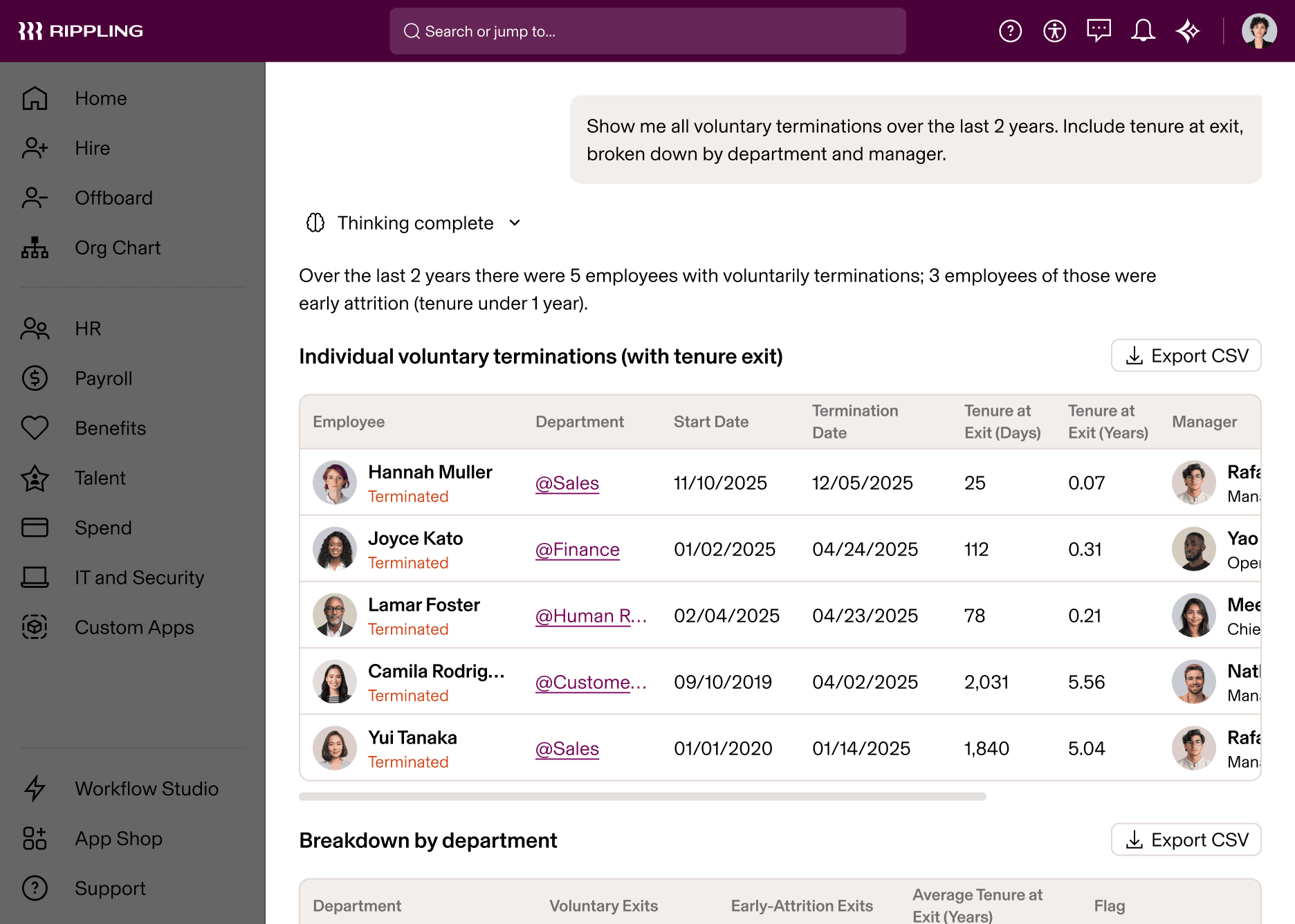
Spot attrition risks by team and manager.
Rippling AI: Built to Do the Work, Not Just Talk About It

In this article
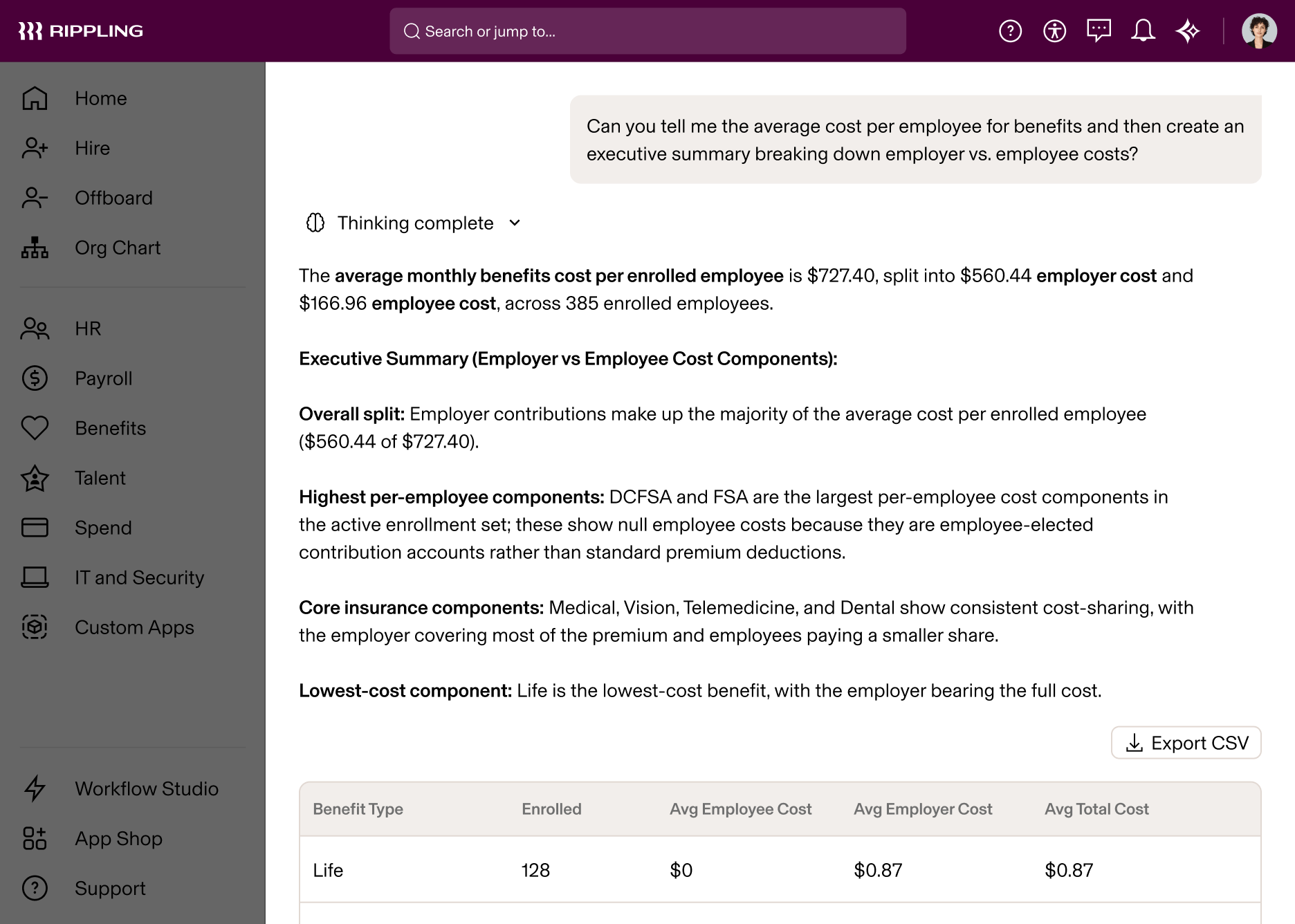
Today we’re introducing Rippling AI. It’s AI that you can trust to answer deeply specific questions about your company using live data, and then take real action across HR, IT, and Finance.
Most enterprise AI products today are built as thin conversational layers on top of existing software. They may be able to retrieve information or generate a plausible response, but they are not deeply integrated with the underlying data model, business logic, permissions, and workflows of the system itself. When dealing with critical business information, that level of integration is not optional, it’s required.
Why Rippling AI is different
It returns exact answers, not educated guesses. When you ask Rippling AI a question, it will express the action you want to take, in code. It writes a query. It generates precise SQL, or writes a formula, or builds a report. This approach creates inherent protections against hallucinations, and means that Rippling’s AI rides the tidal wave of investment the underlying foundation model companies have made in code generation. It also means the answers you get back are auditable and deterministic. Rippling’s AI shows its work, and you can verify the approach it’s taking.
It understands your organization. References like “my team” or “last quarter” resolve against your actual data: specific people, specific numbers, specific records. Ambiguous references to departments, candidates, work locations, and names are resolved up-front (“Which John do you mean?”)
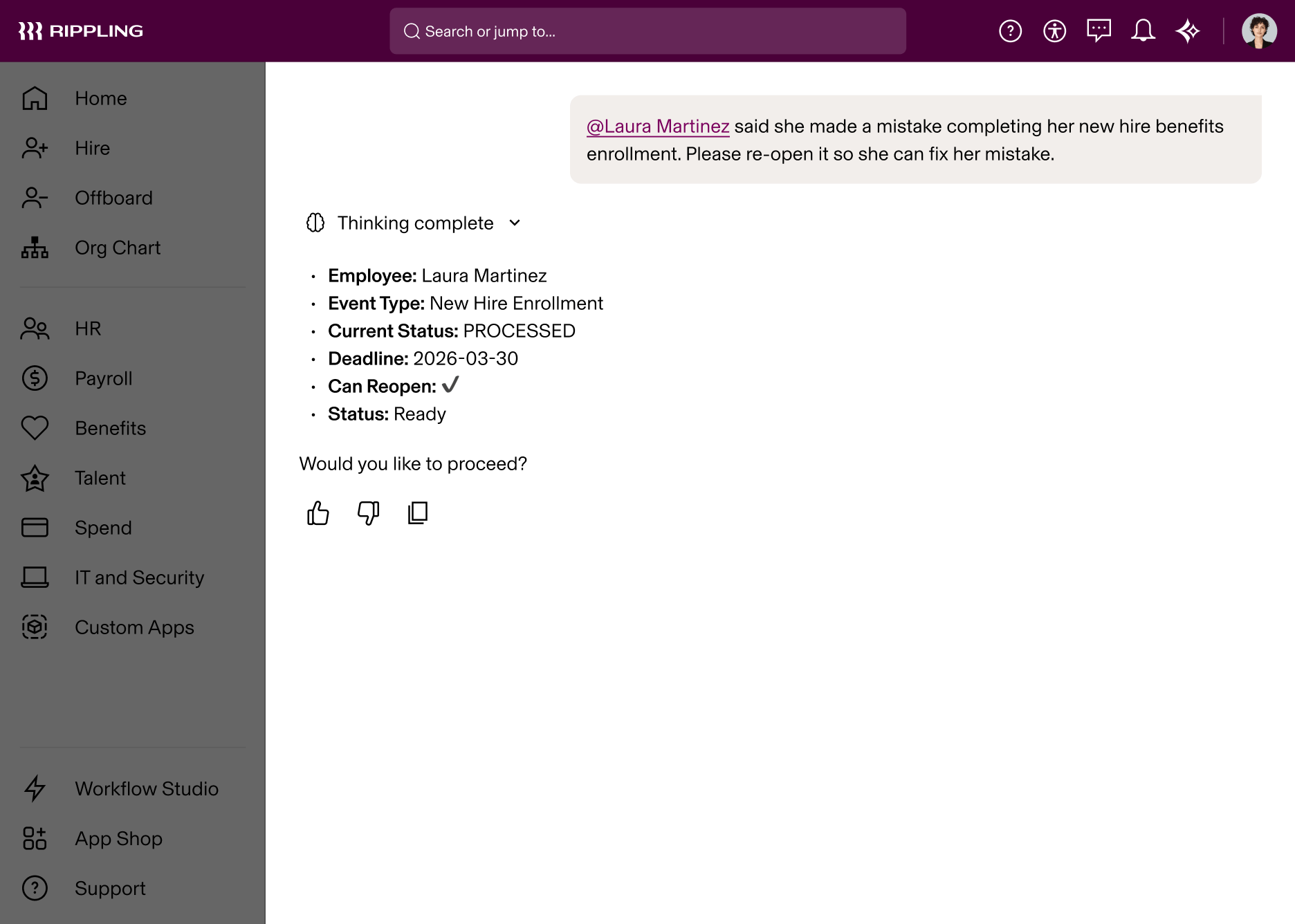
Permissions are automatic. Rippling AI inherits your existing roles and access permissions. A manager sees their team. An HR admin sees more. You cannot trust LLMs to filter or redact data correctly, based on your company’s permissions model – but with Rippling, you don’t have to, because the LLM can only access information that the user it’s chatting with can access themselves. If you instruct the LLM to make changes on your behalf, it will tee them up for your review. And these changes will go through whatever approvals your company requires, the same as if they were made by a human.
You’ll probably never build a report yourself again
Rippling AI can build reports in one-shot, and run SQL analysis off of your data in Rippling. For example, let's say you want to create a report of voluntary terminations over the last 6 years. Simply write a prompt, and instead of hours of manual analysis, you get a detailed answer, plus the underlying reports to inspect yourself.
It can also work from images or documents that you upload. Snap a picture of a chart you drew on a whiteboard, and Rippling AI will build it, directly in our BI system.

It takes the tedious work off your plate
There are many cases where AI can take action in the system on your behalf.
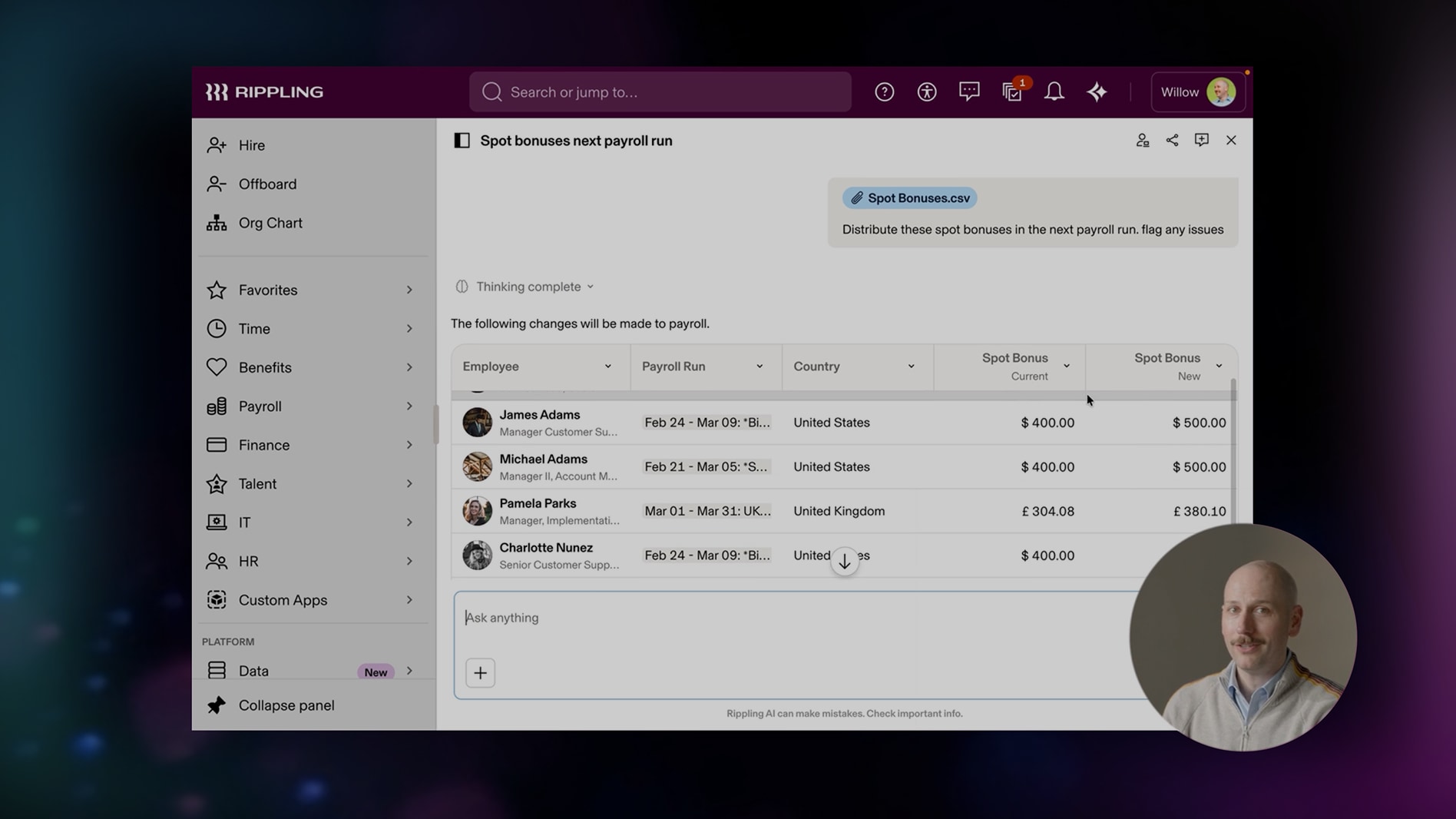
Drop in a messy spreadsheet of spot bonuses for your employees and say: “Add these bonuses to payroll. Convert currencies for my review.” Rippling AI maps columns to employee records, validates the data, flags missing information, converts currencies, and stages the payroll run for your approval. What used to be hours of cleanup becomes minutes of review.
Tell the AI to grant someone (or multiple someones) access to key business systems. “Give Jane access to Salesforce”, “Add our new consultant to our corporate travel system”
Or say you need to restructure a team: “Reassign all of David’s direct reports to Jamie effective Monday.” Instead of manually updating profiles one by one, Rippling AI stages the change in one move so you can review and confirm.



Add one-off bonuses to payroll in seconds.
1/10
It can handle employee questions instantly
Rippling AI gives employees immediate, detailed answers to questions that would otherwise go to HR. Employees can ask about:
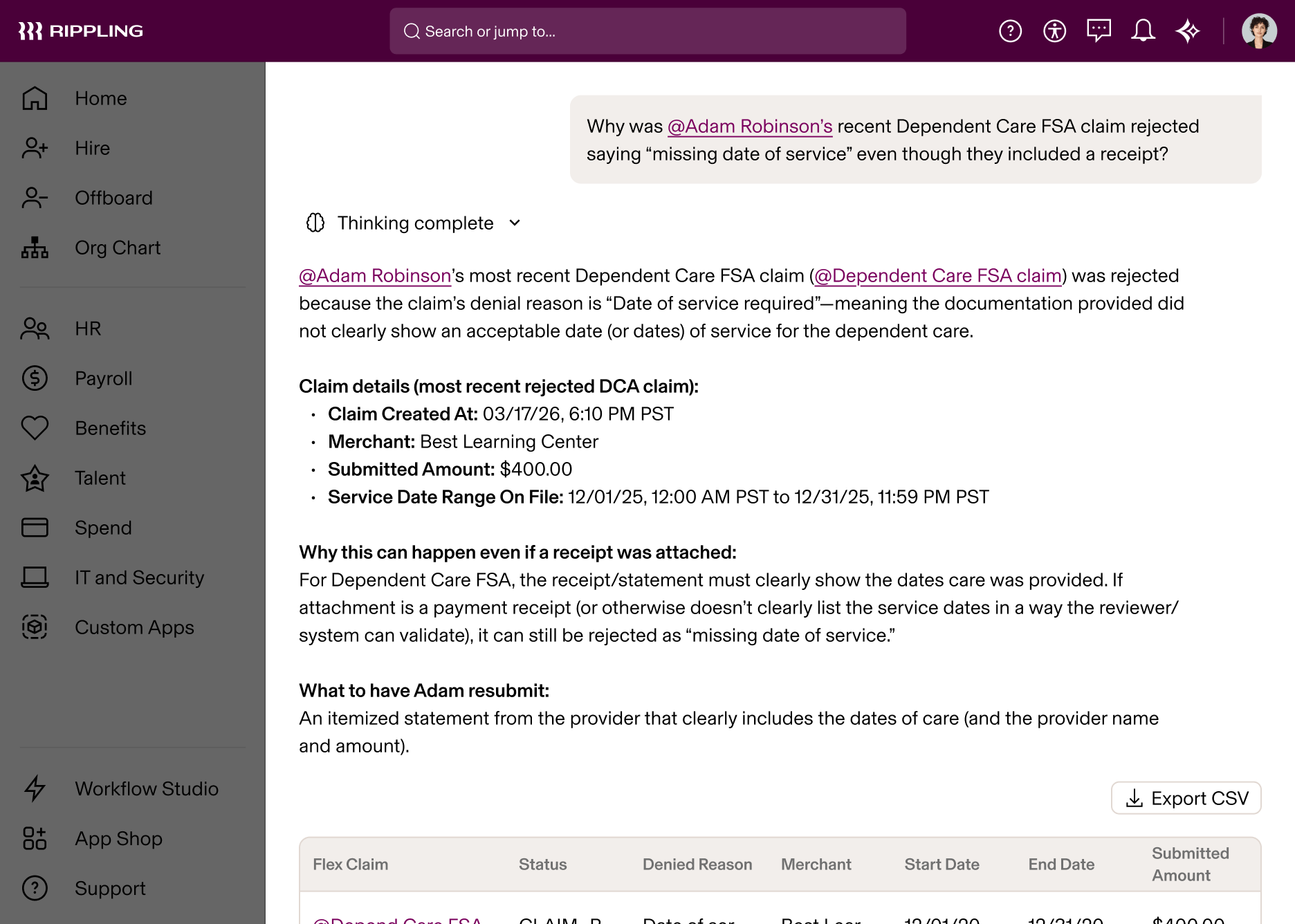
Benefits: “How much does my medical insurance cover for an MRI?” “Why was my FSA claim rejected?”
Payroll: “My paycheck was lower this pay period than last pay period, it seems wrong, what happened?”
Policies: “How much parental leave am I eligible for?”, “What’s our expense policy while traveling?”
Reimbursements: “What’s the status of my reimbursement and when will it get paid out?”
And more.
Employees don’t need to open a case or search for help articles. When an employee doesn’t understand why their paycheck changed, Rippling AI can trace the root cause across payroll, benefits, expenses, and more, and explain exactly what happened.
Get access to Rippling AI
For years, there has been a gap between what leaders want to know and the answers they can get quickly. Teams wait for reports. They chase information across disconnected systems. They make calls without the full picture. Then they spend hours doing manual work to carry out the decision.
Rippling AI closes those gaps. It gives you answers you can verify and actions you can control, all in one place. It helps you understand what is happening, decide what to do next, and move the work forward.
Rippling AI is available today. If you’re already on Rippling, request access to use it with your own data. If you’re not, we’d love to show you what it looks like for your business.
Companies that run on Rippling perform better
Disclaimer
Rippling and its affiliates do not provide tax, accounting or legal advice. This material has been prepared for informational purposes only, and is not intended to provide or be relied on for tax, accounting or legal advice. You should consult your own tax, accounting and legal advisors before engaging in any related activities or transactions.

Author
The Rippling Team
Global HR, IT and Finance know-how directly from the Rippling team.
Hubs
Explore more

13 May 2026
|
7 min
Inside Rippling’s HR Team: How We Use Our Own AI
Most AI tools promise transformation but deliver little more than polished chatbots. Here’s how Rippling’s HR team actually uses AI day to day—from handling payroll and policy questions to automating onboarding, generating reports and reducing admin work across HR, IT and finance.
10 Jun 2026
|
6 min
Inside the Making of Rippling AI
As AI adoption accelerates across HR, organisations face growing pressure to balance efficiency with privacy, compliance and accountability. This behind-the-scenes look at Rippling AI explores how it was built to operate within strict governance frameworks, leverage real-time workforce data and deliver trusted insights for HR, payroll and compliance teams—without compromising security or human oversight.
21 Aug 2025
|
9 min
EOR vs PEO vs ASO: What’s the best fit for UK startups?
Discover the difference between EOR, PEO, ASO and find the right fit for your startup’s HR, payroll, and international hiring needs.

21 Aug 2025
|
11 min
The top 8 ways UK businesses can use AI in HR [2026]
See 8 practical ways UK businesses use AI in HR, from cutting admin to staying onside with HMRC and Employment Rights Act compliance. Built on Rippling AI.

6 Aug 2026
|
9 min
From unchecked AI spend to complete control: How Rippling built AI Spend Console
AI Spend Console gives CFOs and CTOs a clear view of AI spend, connects it to business outcomes, and governs the use of approved LLMs.

5 Aug 2026
|
5 min
It's Not the AI That Scares HR - It's the Data
A survey of 1,000+ HR leaders across Europe, Canada and Australia finds that most now consider themselves intermediate or advanced AI users, second only to R&D. But 92% say there's at least one decision they'd never hand over to AI, and 41% cite data security and privacy as their biggest barrier to further adoption. Here's what's really holding HR back, and how a unified data layer fixes it.

11 Nov 2025
|
6 min
Securing HR’s seat at the leadership table: the ‘admin to advisor’ framework
Discover Rippling’s Admin to Advisor framework — a roadmap helping HR leaders across the UK elevate their influence, harness data, and secure a voice in business strategy.

19 Dec 2025
|
22 min
The best payroll software in the UK: compare the platforms
Explore 15 leading payroll software platforms. Compare compliance, automation, integrations, and scalability to find the right solution for your UK business.
See Rippling in action
Increase savings, automate busywork and make better decisions by managing HR, IT and Finance in one place.