No. Rippling IT is HRIS-agnostic. It integrates with BambooHR, Workday, ADP, Paylocity, Google Workspace, Microsoft Entra, Okta, and other systems to ingest employee data and power IT automation. Your source of truth can stay where it is.
Rippling IT: The only unified platform to manage all IT needs securely
In this article
IT admins have a challenging job. You have to keep your company secure in a constantly changing threat environment, while also making sure employees can easily access the devices, apps, and tools they need to do work without a hassle.
Most IT leaders rely on 7+ solutions to do this work, but each only solves one piece of the puzzle. Plus, these tools can be expensive and difficult to manage. This leaves you filling in gaps with tedious manual tasks, making it difficult to apply advanced security approaches like zero trust.
We firmly believe you don’t need a large team, massive budget, or multiple tools to scale your IT program. You deserve a unified system, with all the features you need, minus the complexity.
That’s why we built Rippling IT from scratch, to empower solo IT admins and lean IT teams to securely manage identity, access, devices, and physical device logistics, all from one platform.
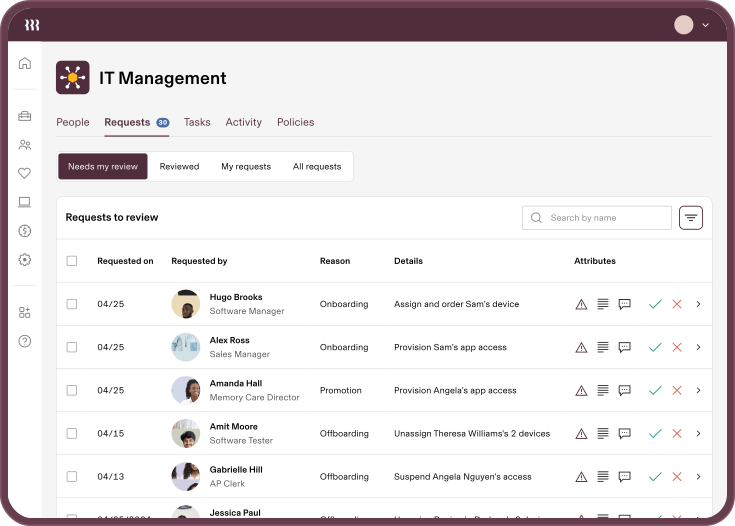
End-to-end IT management
Rippling has understood the value of supporting IT professionals from day one. We’ve used our own IT solutions to efficiently grow to almost 4,000 employees with a very small IT team; shipping laptops, configuring devices, provisioning accounts, and securing offboarding. Running IT this way has helped us grow at a record pace while keeping our IT team agile.
With Rippling IT, you can manage the full user and device lifecycle end-to-end. It includes:
Identity & Access Management: Easily implement SSO, MFA, conditional access policies, role-based access controls, and more, based on hundreds of real-time user and device attributes. Plus, eliminate time-consuming admin work like third-party group management in integrated applications, provisioning during on/offboarding, and more.
Mobile Device Management: Manage and secure all of your endpoints with our unified, cross-OS MDM for laptops, tablets, and mobile devices. Enforce user-driven security policies, automate device monitoring, implement zero-touch enrollment for best-in-class endpoint protection, and more.
Inventory Management: Automate manual tasks around device logistics globally with the ability to order, ship, retrieve, and store devices through Rippling—right from your desk. This helps avoid messy supply closets, missing devices, and last minute trips to Best Buy or FedEx.
All three solutions are powered by Rippling’s shared platform capabilities including a custom workflow builder, dynamic policies, permission profiles and membership lists, powerful analytics, audit-ready reports, and more.
These make it easy to configure Rippling exactly how you want, and everything works together seamlessly. You can be up and running out-of-the-box on day one.
Rippling IT works with your existing HRIS
One of the most common misconceptions about Rippling IT is that you need to be a Rippling HR or Payroll customer to use it. You don’t. Rippling IT can be used as a standalone product—covering identity, app access, device management, inventory, and lifecycle automation—while keeping your existing HR architecture exactly where it is.
Rippling IT integrates with BambooHR, Workday, ADP, Paylocity, Google Workspace, Microsoft Entra, and Okta as your source of truth. Rippling ingests employee data from whatever system you already use and turns that context into downstream IT automation: provisioning accounts, assigning apps, enrolling devices, enforcing policies, and removing access when people leave.
This matters because HRIS migrations are not quick projects. They involve data cleanup, payroll complexity, benefits changes, and months of cross-functional coordination. IT teams don’t have to wait for a migration to start solving urgent problems around app access, device management, or offboarding gaps. With Rippling IT Standalone, you can modernize IT without touching HR first.
Bolster security and streamline IT processes from one platform
This integrated approach to IT management is designed to streamline IT operations and strengthen security using best practices powered by default policies.
Automate the entire lifecycle
Because Rippling IT is a unified platform, it takes just a few clicks to layer in advanced security controls and implement frameworks like zero trust—without spending months configuring systems to work together. Because Rippling makes it easy to precisely target security policies based on user attributes, you can strengthen security without hindering employee productivity. The right users will always have the right level of access to company resources at the right time.
Let’s take a look at the classic example of onboarding and offboarding with Judy, a new sales hire.
Streamlined onboarding: Judy has accepted her offer! Once she is added to Rippling and her start date is scheduled, a series of events are set into motion.
Devices and accessories are ordered from the Rippling store (an authorized reseller) and shipped straight to Judy’s home or new office.
At a specific date and time, Judy’s accounts are created and access is granted based on attributes like her role (Google Workspace, Slack, Jira, Salesforce).
SSO is enabled and Judy is given access to a password manager.
Judy is automatically enrolled in cybersecurity training and is asked to review relevant security policies.
Secure offboarding: To avoid the stress and security risks associated with offboarding, Rippling IT automates every step of the process—down to device retrieval and storage.
Judy’s device is locked and wiped and her shared Google documents, inbox, and calendar are automatically transferred to her manager or other party.
Judy loses access to all apps and accounts.
SSO is disabled and the groups she was in have been updated (Slack channels, Google distribution lists, etc.).
Rippling sends a return box with a prepaid shipping label for swift device return.
Judy’s device is sent to a secure warehouse to be cleaned, tested, and either stored or configured for the next new hire.
Layer advanced security controls in a few clicks
Because Rippling IT is a unified platform, it takes just a few clicks to layer in advanced security controls and implement frameworks like zero trust—without spending months configuring systems to work together. Because Rippling makes it easy to precisely target security policies based on user attributes, you can strengthen security without hindering employee productivity. The right users will always have the right level of access to company resources at the right time.
Here is a high level view of advanced security measures available with Rippling IT:
Streamlined setup: Customize and deploy protocols like device trust in minutes, not weeks, thanks to Rippling’s natively built IAM and MDM solutions.
Layered security: Easily implement SSO, role-based access controls, role-based MFA requirements, password federation, and other custom policies to enforce least privilege.
Precise targeting: Roll out precise security requirements and conditional access rules based on any combination of user and device attributes. As users join, transition, or leave, these dynamic membership lists will automatically update.
Consistent compliance: Meet compliance standards like SOC 2, GDPR, and more with audit-ready reports.
Endpoint security: Rippling has partnered with SentinelOne to provide zero-touch, built-in endpoint protection for threat detection and mitigation.
Cross-OS device management: Easily enforce strong password policies, automated patch management, OS updates, device encryption, and more, to ensure user devices are secure—no matter their operating system.
A deep dive into device trust
Rippling’s platform makes it easier for you to strengthen security at any stage of your company’s growth. Let’s take device trust, a key component of zero trust. Device trust ensures that users are only accessing critical infrastructure from secure, managed devices. However, this can be difficult to implement because you need to configure disconnected IAM and MDM solutions (or even multiple MDMs) to stay in sync, plus the challenge of distributing certificates to devices. It can take weeks, or months, for even mature IT teams to put in place.
With Rippling, it only takes minutes. Our natively unified IAM and MDM work in tandem from the start, and Rippling acts as the certificate authority—so you have zero maintenance costs. You can easily define rules using user attributes to target device trust. For example, you could say all engineers accessing Jira, AWS, and Github have to use a managed device, otherwise access will be denied.
You can also layer on additional conditional rules, like blocking access if a user has traveled a large distance at an impossible velocity, or if they sign in from an unauthorized IP address.
But device trust is just one example of how Rippling’s unified IT platform makes it possible to quickly layer in SSO, role-based access controls, zero touch installation for endpoint protection, password federation, dynamic MFA policies, and more—all of which strengthen your company’s security at any scale.
Less IT busy work and time spent worrying about security
Companies of all sizes use Rippling IT to grow their business securely and manage IT in a way that best meets their needs.
Longevity Consulting, a professional services firm of about 70 employees, used Rippling IT to clean up a SOC 2 audit and eliminate an onboarding process that once took a week. “We probably turned four or five negative findings from our SOC audit into positives just by moving to Rippling. It was that simple,” says Andy Phelps, CTO at Longevity Consulting. “I’ve gone from a week’s worth of work to 10 minutes. I can push a button, add the people in, and the laptops automatically get ordered, shipped, delivered, access granted.”
Sandbox VR, a 600-person immersive entertainment company with locations worldwide, uses Rippling IT to automate device management and app provisioning across its distributed workforce. “We’re always trying to move quickly, and time is money. Without Rippling centralizing IT and HR, I’d be spending up to a full extra day on new hires, just on provisioning app access alone,” says Shannon Saunders, Manager of People Ops at Sandbox VR.
Go-Forth Pest Control, a 315-person company, manages 26 service locations and 300 devices with a lean IT function that once spent 20–30 hours a week on access and device issues. With Rippling IT, that’s down to five. “What used to be a 10–15 person scramble across spreadsheets and apps is now largely automated in Rippling—from account creation to app access—so onboarding actually happens on time without us herding cats,” says Josh Baker, Process Improvement Director at Go-Forth Pest Control.
How Rippling IT compares to point solutions
There are strong products in every corner of IT, but then you’re looking for a point solution and hopefully you are able to integrate the platforms. Rippling IT doesn’t try to win on any single capability in isolation. It is the combined nature of Rippling IT that differentiates it from other solutions on the market, especially with the ability to integrate your HCM data no matter what platform you are using. So, the real question most IT teams face isn’t whether my point solution handles identity well, but it’s whether their identity layer responds automatically when an employee’s role changes, whether their MDM knows to lock a device when someone is offboarded, and whether any of that happens without a manual trigger or a runbook someone has to remember to run. Point solutions leave that connective work to IT.
For teams already invested in specific tools, Rippling can also integrate alongside existing infrastructure rather than replace it. The right starting point depends on where the biggest operational gaps are.
Frequently asked questions
Does Rippling IT require using Rippling for HR or payroll?
What does Rippling IT actually include?
Rippling IT covers identity and access management (SSO, MFA, app provisioning), mobile device management for Mac, Windows, iOS, and Android, app and SaaS lifecycle management, hardware inventory, and security and compliance visibility. These capabilities run from a shared employee record rather than as separate products.
How does Rippling IT compare to Okta or Jamf?
Okta specializes in identity; Jamf specializes in Apple device management. Rippling covers both, along with app lifecycle management, hardware inventory, and offboarding automation, connected to the employee record. Teams that want consolidated workflows across identity and devices often find this reduces the manual coordination that separate tools require.
How does Rippling handle employee offboarding?
When an employee leaves, Rippling can automatically remove access across connected apps, lock or wipe assigned devices, and flag hardware for retrieval, all triggered by the offboarding event in the employee record. The goal is fewer missed accounts and faster, more auditable offboarding.
Can Rippling IT integrate with Google Workspace or Microsoft Entra?
Yes. Rippling IT can ingest user data from Google Workspace or Microsoft Entra and use it as the starting point for downstream IT workflows, including provisioning, access management, device enrollment, and offboarding.
What MDM platforms does Rippling support?
Rippling's MDM covers Mac, Windows, iOS, and iPad devices. It includes enrollment, OS update enforcement, compliance policies, encryption controls, software deployment, and remote actions. Note that the Mac experience is currently deeper than Windows; teams with mixed environments should evaluate Windows-specific requirements during a trial.
Is Rippling IT suitable for a one-person IT team?
Yes. Rippling IT is designed with solo IT admins and lean IT teams as a core use case. The platform is intended to reduce the manual steps that consume the most time, particularly around onboarding, offboarding, and access management, so that a single IT admin can cover more ground without additional headcount.
How long does Rippling IT take to set up?
Setup time depends on the scope of integration and how complex the existing environment is. Device trust and core access policies can be deployed quickly. Connecting to an existing HRIS or identity provider typically requires configuration but not a migration. Rippling's implementation support can help scope the effort for a specific environment.
Get started with better IT management today
You have the option to connect Rippling IT to your existing external HRIS/IdP, or you can use the full power of Rippling and combine our IT and HR solutions for maximum impact.
Unifying your HRIS and IdP creates a single source of truth for real-time employee data, enabling IT and HR to work in lockstep. A single source of truth for employee data makes it easy to navigate the entire employee lifecycle from onboarding to offboarding and everything in between together.Sign up for a free trial or request a live tour to see how any part of your business can run better with Rippling, whether you start with our IT, HCM, or Payroll solutions.
Schedule a demo with Rippling IT today
Disclaimer
Rippling and its affiliates do not provide tax, accounting, or legal advice. This material has been prepared for informational purposes only, and is not intended to provide or be relied on for tax, accounting, or legal advice. You should consult your own tax, accounting, and legal advisors before engaging in any related activities or transactions.

Author
Niki Sri-Kumar
VP Product, IT
Explore more

Oct 22, 2026
|
12 min
How Rippling connects Microsoft 365 and Google Workspace license purchasing to employee lifecycle automation
Rippling connects Microsoft 365 and Google Workspace license purchasing to employee lifecycle automation, so IT and finance can buy, assign, and reclaim licenses as employees join, move, and leave.
Aug 21, 2025
|
3 min
Empowering our workplace heroes: Why Rippling IT stands on its own
Rippling VP of Product shares why Rippling IT stands alone as the first solution to provide a single natively built platform for securely managing identity, access, devices, and inventory across the full user lifecycle.

Oct 30, 2025
|
13 min
Honest Rippling identity and access management review 2025: Pros, cons, features, and pricing
Explore how Rippling identity and access management unifies user provisioning, device tracking, and compliance automation. Learn whether it’s the best IAM for your team in 2025.

Aug 21, 2025
|
9 min
Remote device management for IT teams: How to manage employee devices overseas
It’s tricky to manage your employees’ devices if they work out of home offices around the world. Here’s how to deliver the necessary equipment, keep it protected from afar, and configure mobile devices throughout your remote employee’s lifecycle.
Aug 21, 2025
|
6 min
7 essential automations for lean IT teams
Discover 7 essential IT automations for lean teams with Rippling IT. From seamless onboarding and offboarding to automated device provisioning and inventory tracking, learn how Rippling’s unified platform streamlines workflows and boosts security for IT admins.

Apr 21, 2026
|
2 min
How to Sign Up for Rippling IT
Rippling IT is an ITSM and IAM platform for businesses of any size. Learn what it covers, how setup works, and how to migrate from an existing MDM provider.

May 12, 2026
|
11 min
Benefits of an IT Management Platform for Startups
An IT management platform automates onboarding, offboarding, device control, and security enforcement—so lean startup IT teams can stay on top of a growing environment without burning out doing it manually.
Aug 21, 2025
|
12 min
How to onboard and manage remote employees with Rippling
Unlock the secrets to effortlessly onboarding and managing remote employees with Rippling’s all-in-one platform.
See Rippling in action
Increase savings, automate busy work, and make better decisions by managing HR, IT, and Finance in one place.