How Sequoia Riverlands turned five spreadsheets into one automated cost calculator

In this article
Phil Daubenspeck is the Chief Investments and Partnerships Officer at Sequoia Riverlands Trust. He's a Rippling power user who uses the product to tackle hard business problems.
At Sequoia Riverlands Trust, we do a lot of billing out to our funders or people that we're providing services to. To bill accurately, we need a fully loaded pay rate for each employee — one that includes not just their salary, but taxes, benefits, insurance, overhead, training, time off, and more.
The problem: Scattered data across multiple spreadsheets
Every time we wanted to look at our true employee costs or project out billing rates, our team had to pull data from multiple spreadsheets and do the calculations manually.
It wasn't that we didn't have the data. We did. But stitching it together every time was incredibly time-consuming. And because the information was scattered, it was easy for things to get out of sync.
We needed a way to centralize all of that information so it would be easily accessible and automatically updated when things changed.
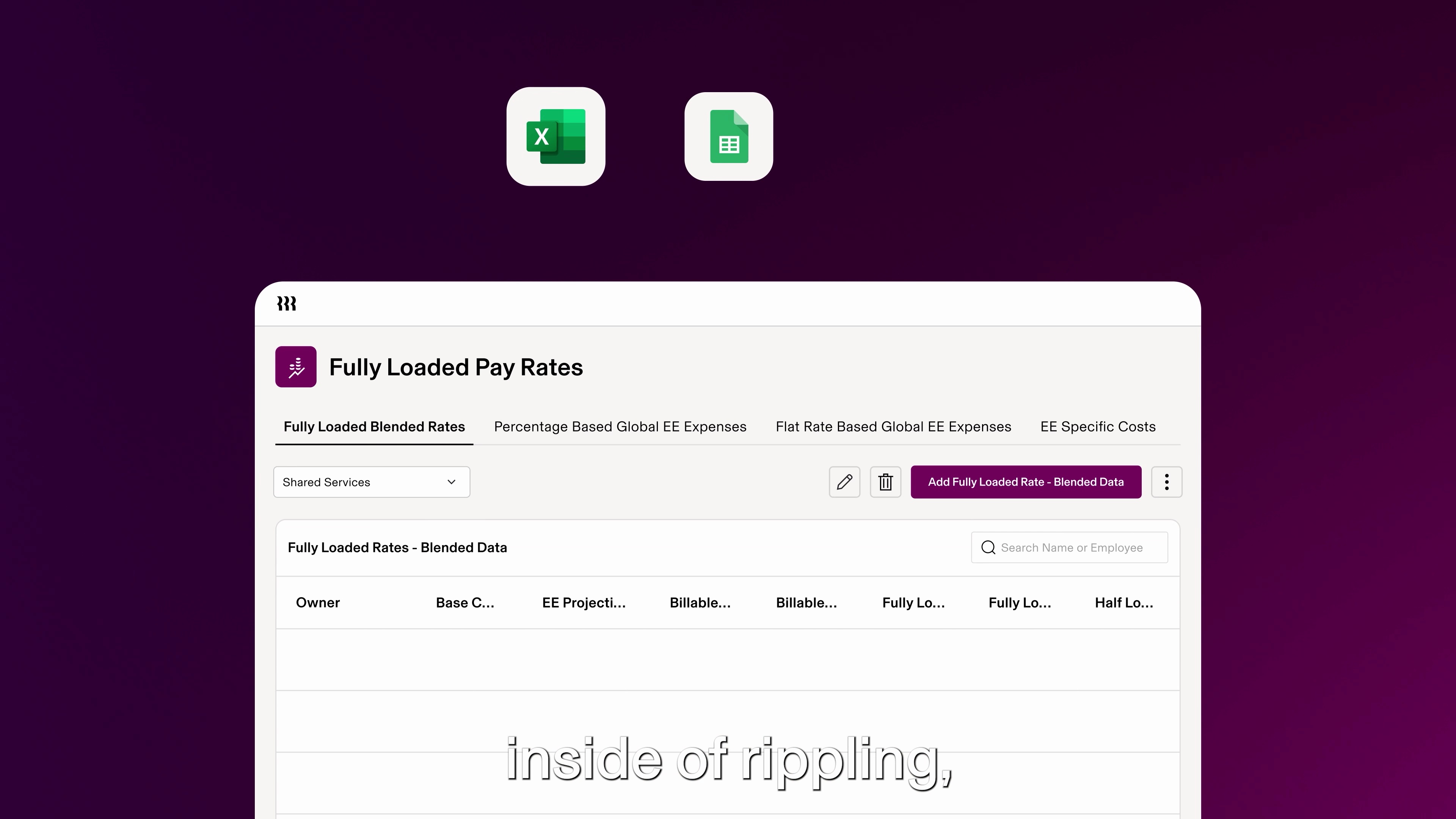
The solution: An employee cost calculator app
Working with Rippling's Forward-Deployed Engineering team, we built an app that gave us the centralization we needed. Here's how we built it.
Step 1: Map out the data we need
Before meeting with the team, I had spent some time mapping out the information we'd need. When I got there, we sat down and figured out specifically where those pieces were going to land in the app. Within 20 to 30 minutes, we started building.
Step 2: Organize the data structure
Part of the challenge was figuring out how to store and organize the data so it would be easily accessible. Making it easy to update was really important to us. We talked through different approaches — if we do it this way, here are some limitations; if we do it that way, here are others.
Some of those limitations I knew about. Some I didn't. Being able to ask questions like "What if a number needs to become a currency?" or "How do we make this field work?" was really helpful.
The Rippling team was extremely knowledgeable, very friendly, and very curious about our business and the work we're doing on the ground. They were guiding the conversation and not trying to catch up with me, which was great.
Step 3: Build the app to pull and display costs
The app now holds all our data inside Rippling. For every employee, it pulls their base salary, taxes, benefits, time off, insurance, overhead (like real estate and business software expenses per spread per employee), training, and all the other costs that go into their true employment cost.
By combining internal Rippling data with external overhead data, the app calculates a complete picture of what each employee costs us — individually and with a fully loaded pay rate. And because so much of the data already lives in Rippling, it auto-updates without us having to manage multiple spreadsheets.
The impact
This app has completely changed how our finance and billing teams work.
Instant access to billing rates
We can now pull information virtually instantly whenever we have a question about costs. Before, our team had to pull data together and do the calculations every single time.
Better cost recovery and planning
Our app allows us to project out what billing rates will be in the future. We have a much better idea of what it costs us to operate our departments and what it costs us to employ specific people. This will help us recover more funds that are spent on the projects we're working on.
Time savings and better morale
This will make a pretty incredible impact on the time it takes for us to bill our clients. And spending less time in spreadsheets? That's for sure going to help morale around the office.
Disclaimer
Rippling and its affiliates do not provide tax, accounting, or legal advice. This material has been prepared for informational purposes only, and is not intended to provide or be relied on for tax, accounting, or legal advice. You should consult your own tax, accounting, and legal advisors before engaging in any related activities or transactions.

Author
Phil Daubenspeck
Chief Investments and Partnerships Officer
Hubs
Explore more

Rippling Solutions: On-demand custom apps, built for you by Rippling engineers
Fix broken workflows with custom-built apps and automations created by Rippling engineers — built inside Rippling with your data, permissions, and policies.
How Fluxx turned offboarding into a one-click process
See how Fluxx automated employee offboarding and eliminated manual spreadsheets with a custom Rippling app.

How Athena automated license tracking for 250+ clinicians
See how Athena managed license tracking for 250+ clinicians, eliminating manual spreadsheets and ensuring compliance with automated renewal reminders.
Cost-benefit analysis: Examples, benefits, and how to conduct one
Learn what a cost-benefit analysis is and its advantages for businesses’ finances. Discover how to perform a cost-benefit analysis and examples.
Announcing five new time-saving tools for accountants
Explore Rippling's five new tools that help accountants boost productivity and efficiency. Find out how these tools can benefit your accounting processes.

5 Real HR Automations Saving Teams Time & Money
What do automated referral bonuses, compliance trackers, and one-click dashboards have in common? They're saving HR teams hundreds of hours every year. Meet 5 companies that turned their busiest tasks into seamless automations—and the results speak for themselves.
How we promote employee wellbeing and avoid burnout with automated time-off reminders in Rippling
Learn how Rippling Wavemaker Leif Oldert automated time-off reminders to operationalize a wellness culture at Clicklease.
Streamline onboarding with automated app provisioning and personalized communications in Rippling
Learn how Rippling Wavemaker Leif Oldert automated onboarding and saved managers and IT teams hours of manual work.
See Rippling in action
Increase savings, automate busy work, and make better decisions by managing HR, IT, and Finance in one place.